Monday, May 16, 2011

Information Visualization and Keyword Searching in Library Instruction

Matt Conner and Melissa Browne, University of California, Davis
May 7, 2011
2011 LOEX Conference

Download the Powerpoint Presentation
Visual Literacy is the ability “to produce and consume images.” Matt Conner and Melissa Browne promote the concept of Information Visualization, which “represents data with visual designs that assist comprehension and insight.” To illustrate the connection between vision and cognition, Conner used the example of the blind who have had their vision surgically restored, but are unable to process what they see (reminded me of the movie At First Sight).

Undergraduate Search Behavior
  • Search strategies: Undergrads use either single word or long natural-language search statements. This works in Google, but not in most library databases. Undergrads also use the same tools and strategies regardless of the information need.
  • Reading habits: Most students don’t read articles thoroughly, but prefer to skim.
  • Cues: Students also prefer to look at sources with more “graphical/visual representations.”

Their conclusion: “It’s more difficult than ever for students to translate subject knowledge into appropriate search strategies for scholarly research!” Their hypothesis: “Information visualization techniques improve students’ abilities to conceptualize topics and generate terms for academic online research.” Conner and Browne are currently conducting a study with Undergraduates to test this hypothesis

3 Pedagogies
  1. Keyword matrix: This keyword matrix is a little different than what I have used in the past. In this matrix the topic goes in the middle row and the student brainstorms general terms in the top row and more specific terms in the bottom row.
  2. Google’s Wonder Wheel: I’ve used the Wonder Wheel for concept mapping and development of research topics, but I haven’t tried it for keyword generation.
  3. EBSCO’s Visual Search: An alternative to the traditional search results display, Visual Search helps to narrow results with an emphasis on subject headings. Ebsco is one of the the few database providers that offer a visual search option. For my own research, I prefer the traditional view, but this presentation inspired me to try out the visual search option with students.

The Study
The presenters are currently conducting a study of the three pedagogies. As of the presentation, only about a third of the results have been analyzed. The following results are based on the data analyzed as of the presentation.
  • How students generate search terms: 1. Google 2. The topic itself 3. Course materials
  • The most difficult part of research: 1. Credibility 2. Narrowing (Information overload) 3. Relevance

Preliminary results of the study reveal:
  • No significant difference in the number of search attempts.
  • No significant difference in time spent searching.
  • Students “expressed great enthusiasm” for the term-generating tools.

Conner and Browne also made the following observations.
  • “Students did not rely on keywords.”
  • Students reacted to information. They used links instead of keywords to further their search.
  • “Adapted results to fit preconceived pattern for paper.”
  • “Wide variation is search strategies.” Examples of search strategies include “termers,” who frequently modify their search strategies, and “limiters,” who rely on database limiters to modify searches. Students were not using advanced search strategies such as phrase searching or truncation.
  • “Student’s assessment of search success did not match always match the investigator’s assessment.”

Discussion
Based on the preliminary findings, the Conner and Browne state that “Information visualization techniques appear to help students with conceptualizing topics but don’t really impact keyword search strategies.”

Tuesday, May 10, 2011

Ensuring Valid and Reliable Assessments of Student Learning Workshop

Megan Oakleaf, Syracuse University
Thursday, May 5, 2011, 1:00pm - 4:30pm
2011 LOEX Preconference

The first part of the workshop focused on outcomes and performance assessment. The second part covered rubrics.

Outcomes
Megan Oakleaf briefly discussed the necessity for "clear, meaningful, transferable, learning outcomes." How will students be able to use what they learn in other contexts. Ensure that the outcomes are relatable, but not overwhelming.

There are a lot of different formulas for writing outcomes, but all good outcomes begin with active verbs. See Assessment-as-Learning.

Performance Assessment
Oakleaf stressed active learning. She briefly discussed the "Understanding by Design" approach before discussing performance assessment. Performance assessments “focus on student’s tasks or products/artifacts of those tasks.” These assessments “simulate real life application of skills.” I was surprised to learn that your instruction/learning tool can also be your assessment tool. It seems so obvious, but I had never thought of it that way. For example, observing students completing a class activity such as a database search can be an assessment. Develop a checklist and check off as a student meets the criteria. She used the example of tallying how many students locate an appropriate article. In our introductory workshop, we could keep track of how many students are able to locate on book on their own in our find-a-book activity.

Rubrics
Rubrics “describe student learning in 2 dimensions:” indicators/criteria and “levels of performance.” Oakleaf introduced us to the RAILS (Rubric Assessment of Information Literacy Skills) project: www.railsontrack.com.

Rubric Creation Process
  1. Reflecting: "why did we create this assignment/assessment?" "What happened the last time we gave it?" "What is the relationship between this assignment/assessment and the rest of what students will learn?"
  2. Listing: "What specific learning outcomes do we want to see in the completed assignment/assessment?" "What evidence can students provide in this assignment/assessment that would demonstrate their learning.". "What are our expectations of student work? What does it look like?"
  3. Grouping and labeling: "Can we group our brainstorms in categories?" "How can we label them?" The labeled groups are now the "criteria."
  4. Creating: Draft the performance descriptions. Define the highest level of or best possible student performance. Define the worst and other developmental levels as needed.
In order to avoid the most common rubric design flaws, describe what a student at that level ‘looks’ like.

Rubric Norming Process
Oakleaf recommends norming rubrics when multiple graders will be using the same rubric. This will limit discrepancies among evaluators.
  1. Think aloud about an example. Criterion by criterion, share how you came to your performance rating.
  2. Raters independently evaluate examples.
  3. Raters come together to identify similarities and differences in scoring patterns.
  4. “Discuss and reconcile inconsistent scores.”
  5. Repeat steps 2-4 new samples until consensus.
Closing the Loop
Based on your assessment, “Enact decisions to increase learning.” Assessment is useless if you don’t do this.

Monday, May 09, 2011

Pirate maps, tattoos, and flus: Using a problem-based format to teach information literacy skills

Kerri Shaffer Carter and Emily Buzicky, Westminster College
Friday, May 6, 2011
2011 LOEX Conference

Presentation: http://prezi.com/j99m8dqg5khw/pirate-maps-tattoos-and-flus-using-a-problem-based-format-to-teach-information-literacy-skills/
Download the handout.

Problem-based learning (PBL) in library instruction is an attempt to provide instruction that more closely resembles the research process. In problem-based learning,“students are presented with an ‘ill-defined’ problem or issue ‘prompt.’ “Students work in groups to identify problem, research issue, and present a solution or hypothesis.”

Kerri Shaffer Carter and Emily Buzicky modeled the session after the problem-based format.
Session Timeline:
  1. Introduction to problem-based learning
  2. “Use scenarios and prompts to create a PBL lesson plan
  3. Sharing
  4. Debriefing (student reflection and instructor feedback)
During the session we had the opportunity to develop a PBL lesson plan. We were given a few sample scenarios and possible prompts. We were also given questions to consider, such as learning objectives, what foundational knowledge is required, and what resources will students be provided with. We developed the following rough lesson plan in about 20 minutes.
  • Class: Economics (non-business majors)
  • Time: 2 hours (I wish!!!)
  • Objective: Students will develop a research topic. Students will select the most appropriate research tools.
  • Prompt: Examine the Home Values Graph. What caused the various declines and inclines in home values? As a group, select one of the issues, events or trends represented in this chart for further research. Select at least three search tools that are appropriate for your chosen topic.
  • Materials: Home Values Graph and a list of possible search tools.
Collaboration among students is a significant component of PBL. The presenters admitted that it is “messy.” In my group work, we realized that it could be unpredictable. There is no right or wrong answer and each group will come up with something different. It will be necessary for the librarian and/or instructor to check-in with each group in order to answer questions and provide guidance.

Bridging the Gaps: Transliteracy as effective pedagogy for information literacy

Lane Wilkinson, The University of Tennessee at Chattanooga
Friday, May 6th, 2011
2011 LOEX Conference

Presentation: http://www.slideshare.net/lanewilkinson/loex-2011-transliteracy?from=ss_embed

Lane Wilkinson defines transliteracy as “the ability to read, write, and interact across a range of platforms, tools and media.” It is how we navigate information sources and understand how the sources fit together. It originates with the Transliteracy Project, a study of online reading. Transliteracy encompasses new media, new linguistic competencies, new literacies and what Wilkinson calls the Descriptive Literacies (see slide 27). He used the Twitter hashtag as an example of a new linguistic competency.

Wilkinson offered these “three keys for library instruction."
  1. “Effective information use requires several information sources.” Students will continue to use Google and Wikipedia and we need to teach them to use these sources effectively. “Address non-library resources at the start.”
  2. “Information sources do not stand alone, they interact.” Library instruction needs to emphasize the similarities between library and non-library information sources.
  3. “Navigating across information resources requires transferable skills.” Students search by discovery. Take advantage of this “mental model” and teach how popular and scholarly information sources are similar. “Understand transferable skills”
  • “Make overt connections.”
  • “Provide links to specific applications.”
  • “Focus on the purpose of strategies.”
  • “Include time for student reflection.”
  • “Consider how strategies might be adapted.”
  • “Provide feedback to students.”
  • “Provide opportunities to apply, re-apply and re-teach.”
Interfaces change. Teach skills that are interface-independent.

At the University of Tennessee at Chattanooga students use Wikipedia to complete a research question worksheet before coming to library instruction.

To sum it all up: Transliteracy is the application of information literacy skills.

Learn more at the Libraries and Transliteracy blog: http://librariesandtransliteracy.wordpress.com/2011/05/09/transliteracy-loex-2011/ and http://librariesandtransliteracy.wordpress.com/

Instruct, Engage, Influence: How Educators Can Become Agents of Organizational Change

Melanie Hawks, University of Utah
Friday Morning, May 6th, 2011
2011 LOEX Conference

The conference opened with plenary speaker, Melanie Hawks, author of Influencing Without Authority. I picked up the following tidbits from her presentation.
  • The effects of long-term influence are not immediately evident.
  • Understand the environment you are trying to influence. You will have to adapt to the environment before you can influence.
  • Think of your co-workers as customers. Customers want what they want and have options.
  • You can’t predict the results. Develop relationships with the people who have influence.
  • A great way to influence, is to first approach people with an offer of how you can help them.
  • Stress the common goal.
  • She has attended Influencer training which discusses “vital behaviors.” A vital behavior is a single behavior that often leads to other wanted behaviors. It is simple, clear, direct and benefits the person performing the behavior.
  • A “Call to Action” is an advertising strategy informing people of what you want them to do. It is also important that you make it easy for them to do it. She used the example of the Buckle Up America campaign. The logos are simple and to the point. It is easy to understand what is wanted. Car manufacturers also make it easy by providing seat belts for every passenger and warnings when you’re not buckled up.

Thursday, March 05, 2009

Student Response Systems in Library Instruction

A few months ago, Evelyne Corcos and Vivienne Monty published a study of student response systems in library instruction. Their article, “Interactivity in Library Presentations Using a Personal Response System” appeared in EDUCAUSE Quarterly. Personal response systems (PRS) (aka student response systems or audience response systems) allow students to use wire-less clickers in order to respond to instructors’ questions. An instructor poses a multiple-choice question and students respond by clicking the appropriate button on wire-less, handheld “clickers.” The instructor can display the live results to the class or to him/herself.

In Corcos and Monty’s study of personal response systems (PRS), York University students participated either in traditional library instruction or PRS-enabled instruction. The librarians selected PRS as a means of increasing student interactivity in library instruction. Students in the PRS classes ranked instruction as more enjoyable and engaging and better presented and organized. The librarian in the PRS classes enjoyed knowing students were active by their clicker responses. Nevertheless, PRS did present challenges in time involvement and technical difficulties. Corcos and Monty recommend “a standardized routine for setting up the PRS equipment and software.”

Pros

  • Immediate feedback
  • Opportunity for formative assessment
  • Tailor instruction based on responses
  • Identify areas of low comprehension
  • Anonymity reduces student embarrassment

Cons

  • Technical difficulties
  • Pre-set questions reduce flexibility
  • Requires more preparation

The authors don't list this as a con, but it seems to me that keeping up with the clickers could be a hassle. How do prevent students from accidently taking the clickers home? Anyways, I would still love to try them.

Wednesday, July 16, 2008

My Latest Project

I’m Back! It has been almost a year since my last post. I didn’t drop off the face of the Earth, but have been consumed by my latest project, creating life. My little girl was born March 26. I’m still adjusting to life as a working mother, but I plan to continue the blog. I doubt I’ll post as often as I did before my hiatus, but I will try to post regularly.

For you other/potential Parent Librarians, here are a few resources I have found helpful.

ACRL Balancing Baby and Book Discussion Group: lists.ala.org/wws/rss_request/babyandbookdg
I attended the group’s first meeting at Midwinter, but I missed the Annual meeting. The Listserv has been quiet so far, but it is pretty new, so hopefully it will grow.

Libparenting: groups.yahoo.com/group/libparenting
A quiet Yahoo Group, but has occasional discussions.

Pregnancy and Parenting Search Engine: www.google.com/coop/cse?cx=018242335511370675646:yhqfdetbe4u
Search some of my favorite pregnancy, parenting and baby sites.

Various bookmarks: http://del.icio.us/amygf/Parenting and http://del.icio.us/amygf/baby

If you know of additional resources, please post a comment!

Thursday, August 16, 2007

10 Easy Ways to Engage Students

In a College Teaching article, Tara Gray and Laura Madson provide the following 10 tips for engaging students.

Always

1. Maintain sustained eye contact.

2. Ask before you tell.
This is closely related to the Socratic Method, which I discuss in this post: Any Questions.

3. Create a structure for note taking.
I call this Guided Notes and mention it in this post: Have Topic Will Travel.

4. Let the readings share your lectern.
This might be possible if you can convince an instructor to assign a reading before the classes’ library workshop. I don’t think it is possible with open workshops.

Sometimes

5. Use the pause procedure.
Pause so that students can compare and discuss notes for 2 minutes.

6. Assign one-minute papers.
This is a popular assessment method in library workshops. Here is a great handout on one-minute papers: www.csupomona.edu/~biology/teaching_bytes/one-minute-paper.pdf.

7. Try think-pair-share.
I have had success with this method. Read more about it www.wcer.wisc.edu/archive/CL1/CL/doingcl/thinkps.htm.

Hold Students Accountable Daily

8. Quiz daily.
Many libraries use pre- and/or post-quizzes for assessment purposes.

9. Use clickers or colored cards.
This upcoming semester, I plan to try out Numina II SRS (aa.uncw.edu/numina/srs/). It is a free, web-based student response system.

10. Call on a student every 2-3 minutes.


Gray, Tara and Laura Madson. “Ten Easy Ways to Engage Your Students.” College Teaching 25.2 (2007): 83-87.

Monday, August 06, 2007

Teach Like An Expert

In a LOEX Quarterly 2-part series, Eric Frierson applies 6 principles of the effects of expertise on instruction to library instruction. These 6 principles were taken from How People Learn.

  1. Experts notice features and meaningful patterns of information that are not noticed by novices,” so teach information in chunks.
  2. Experts have acquired a great deal of content knowledge that is organized in ways that reflect a deep understanding of their subject matter,” so help students see the ‘big picture.’
  3. Experts' knowledge cannot be reduced to sets of isolated facts or propositions but, instead, reflects contexts of applicability: that is, the knowledge is ‘conditionalized’ on a set of circumstances,” so help students understand how and when to use the information learned.
  4. Experts are able to flexibly retrieve important aspects of their knowledge with little attentional effort,” so make each step clear.
  5. Though experts know their disciplines thoroughly, this does not guarantee that they are able to teach others,” so study pedagogy.
  6. “Experts have varying levels of flexibility in their approach to new situations” so teach students to be flexible as they apply the information learned in different situations.

In summary of part I, Frierson states:

“Think of ways to chunk instruction into pieces that fit together to form a whole, providing students with organizing ideas to help them recall strategies associated with one another. Describe how each chunk fits together to explain the big picture of library research, and then find a way to say that to students. Finally, think about how and when students will be using these tools. Tailor the instruction to frame the tools in those ‘how’s and ‘when’s.”

Bibliography

John D. Bransford, Ann L. Brown, and Rodney R. Cocking, eds. “How Experts Differ from Novices.” How People Learn: Brain, Mind, Experience, and School. Washington DC: National Academy Press, 1999. http://www.nap.edu/html/howpeople1/ch2.html

Eric Frierson. “Instructional Design with Expertise in Mind (Part 1)” LOEX Quarterly, Winter 2007: 4-5+

Eric Frierson. “Instructional Design with Expertise in Mind (Part 2)” LOEX Quarterly, Spring 2007: 4-5+

Thursday, July 05, 2007

Art of Persuasion: Strategies for Effective Communication with Chief Academic Officers

2007 ALA Annual Conference
June 25, 2007

1:30-3:30

Moderator: James P. Honan
Panelists: William W. Destler, Elise Bickford Jorgens, and Dominic Latorraca
Program description at www.ala.org/ala/acrl/acrlevents/acrlatannual/ACRLannprog.htm#presprog

Thanks to this sluggish shuttle buses and the fact that this session moved from the room printed in the program to one even more difficult to find, I missed the panelist’s opening comments, but this was a very informative program. The panelists all had some great insight into the minds of college deans, VPs and others in upper administration. It was also great to hear from CAOs (Chief Academic Officers [http://en.wikipedia.org/wiki/Chief_Academic_Officer]) who valued and supported libraries. The CAOs on the panel offered the following suggestions for working with CAOs on your campus. Unfortunately, I was in the back and couldn’t see who was saying what.


Do’s and Don’ts
  • Don’t just submit an inflation-based bill
    • Include descriptions of how you will improve services in your budget requests
    • Show how the funds will support the library’s strategic direction and that of other departments
    • Back up your requests with requests with research and support
    • Can you convince others?
      • Show how your proposal will solve a problem. CAOs appreciate this because they are constantly seeking solutions for various problems.
      • Don’t just say “Higher education is moving in this direction.”
  • Is your CAO a natural ally?
  • Don’t go around your CAO. Deans and etc. don’t like surprises
  • Provide ideas on how to make the transition to future of higher education

Library’s Role in Conversations about New Programs and Faculty

  • CAOs expect libraries to reallocate funds out of resources for declining programs into resources for emerging programs.Evidence of this will help with requests for additional funds.
  • When departments are preparing proposals for new programs, remind them it is their responsibility to include learning resources in the proposals

External Funding Sources (like Friends of the Library)

  • Beware of the donor’s goals
  • Today’s libraries distinguish themselves through their special collections.Target these collections in fundraising.

Merging of Libraries and Technology

  • Role of librarians will change from providing the best information to helping students shift through the deluge of information and picking the best information
  • Libraries will be doing more information literacy instruction. Libraries need to carve out their areas that will always be academic because these areas will always have a strong teaching component.

Questions and Answers

  • Libraries and learning outcomes assessments
    • Libraries can be included in general and department specific learning outcomes. Libraries are frequently included in critical thinking learning outcomes
    • Find out how the library can help other departments assess their learning outcomes.
    • At one of the schools represented, the library dean serves on the General Education Curriculum Committee, which is drafting assessable learning outcomes
  • Approaching a new president
    • Invite him/her to the library. Provide examples of the ways students access information and show off technology and special collections
    • Check with the your supervising academic officer first and invite to join
    • Know how you will answer if asked what you need
    • Frame your strategies for working with the new president around what you know about him or her (what did they do/support at their previous institution)
  • Provide a lot of information when presenting case for keeping a high tech library high tech
  • CAOs use benchmark data heavily. Phi Beta Kappa and other organizations can be allies.

I had to leave at this point so I wouldn’t be late for my shift at the NMRT booth. But I picked up on some themes.

CAOs are in risky positions. They will listen to you if they believe you can make their job easier. They also place a lot of value on evidence, like what you have done already and hard data.

They see the roles of libraries and librarians changing. As technology makes more information easily accessible, they expect libraries to provide evaluation expertise and instruction. CAOs also expect their libraries to develop special collections that set the library and school apart.

CAOs receive demands from many directions. It is the library leadership’s responsibility to educate them about libraries and keep them informed. Libraries cannot expect automatic handouts. We must provide evidence and sound arguments for our requests and be willing to propose compromises. Nor can we be bashful. We must display and flaunt our innovations, successes and triumphs.

Read more coverage of this session at www.insidehighered.com/news/2007/06/26/ala.

Friday, June 29, 2007

What Being a Very Important Person is Like: Serving on ALA Council

Several people who are thinking about running for ALA Council have asked me what it is like. Even though I have been an ALA Councilor for a full year, I am still learning. The best way to find out is to attend Council sessions. For those who can’t attend the sessions, the following reflects my experience as a new (and learning) Councilor. You can find a description of Council and councilor duties at amyferguson.net/Documents/Councilor_job_description.rtf. Oddly, I couldn’t find this document on the ALA website, so I have posted it on my personal website.

The first thing potential councilors must be aware of is the time commitment. While most ALA conference attendees went home Monday or Tuesday, councilors had to stick around until Wednesday. Below is the 2007 Annual Conference Council schedule. We had a similar schedule at the Midwinter meeting in January. That’s another thing; Councilors are expected to attend Annual Conference and Midwinter Meeting each year of their three year term. ALA Councilors also serve on ALA-APA (ALA Allied Professional Association) Council. However the half hour information session and hour long council session are small additions to the general council schedule.

9:00-10:00am Sunday ALA Council/Executive Board/Membership Information Session (NOT Required)

No action takes place during this session. Like the title suggests, the session is for information only. The Treasurer, President, and a few others presented their reports and received a few questions.
10:00-10:30am Sunday ALA-APA Information Session (NOT Required)
Similar to the above session, but shorter.
10:45am-12:15pm Sunday ALA Council I (REQUIRED)
I missed this session. But I e-mailed the Council Secretariat, so this was an excused absence. I don’t know what happens if you get an unexcused absence or too many absences. Detention?
During Council I, II, and III, ALA Officers and some others presented their reports. Some of the reports include items requiring Council action, such as the budgetary ceiling recommend in the Treasurer’s report. Resolutions, such as the Resolution on Funding for the National Library Service, are also discussed and voted on during these sessions.
10:15-11:15am Monday ALA-APA Council (REQUIRED)
I missed this session, but it is the same people and procedures as the general ALA sessions.
8-9:30pm Monday Council Forum (NOT Required)
A slightly less formal setting for Councilors to discuss items from the next day’s agenda. It seems to shorten Council sessions slightly by giving the few councilors in attendance a chance to debate and fine tune upcoming resolutions.
9:15am-12:45pm Tuesday ALA Council II (REQUIRED)

4:30-6pm Tuesday Council Forum (NOT Required)

8am-12:30pm Wednesday ALA Council III (REQUIRED)

The only difference between Council III and the other 2 sessions is that Memorials, Tributes, and Resolutions are presented.

Participation on ALA council also requires knowledge of parliamentary procedure, which is very complicated and sometimes confusing. In fact, ALA employs a professional parliamentarian during meetings to provide assistance and guidance. Here is just one example of the confusion born out of parliamentary procedure: If someone motions for an amendment to the resolution being discussed, discussion on the motion as a whole ceases so discussion of the amendment can begin. We must discuss and vote on the amendment before we can return to the whole resolution. Whether or not the amendment passes, we must still vote on the resolution itself. This got even more confusing during Council III when an amendment to an amendment was proposed.

I can see where parliamentary procedure can be necessary to ensure fairness and organization, but I still wish it was simpler. ALA uses Alice Sturgis’ Standard Code of Parliamentary Procedure, commonly referred to as Sturgis. An introduction to Sturgis is provided during the Council Orientation for New and Reelected Councilors at Annual and Midwinter. I attend these sessions when I can because I am a long way from being comfortable with Sturgis.

In addition to the time and complication of council, sessions can also become tiresome thanks to a small number of people who talk a lot (you know who you are). A few resolutions passed with little or no discussion. But others elicited lengthy debates. Some discussion is good because it provides background, clarification, clears up misunderstandings and exposes the strengths and weaknesses in a resolution. I have changed my initial “gut” decision after hearing sound arguments. This usually occurs at the beginning of the debate. Unfortunately, some people insist on sharing their opinions long after it appears everybody has made up their minds.

Sometimes the debate isn’t even about the resolution. A motion to form a task force to study e-Participation in the association instigated a discussion on the value of e-participation and not on the formation of a task force itself. When it was eventually pointed out that the task force would study these issues, councilors continued to make recommendations to the not-yet-formed tasked force. Couldn’t these recommendations be made once the task force is formed and directly to the task force instead of on council floor?

I can’t find where it is stated, but only Councilors can speak on the Council floor. When a councilor moved to Suspend Rules so an ALA member could speak, the motion was defeated. Yet, when somebody moved to Suspend Rules for the ALA President-Elect to speak, the motion carried. Go figure.

For most of this post I have been critical of Council and you are probably thinking ALA Council should be avoided like Fergie on helium. But I still encourage you to run. First, the council roster needs a shake up. Some councilors have served multiple terms and it is not a very ethnically diverse group. (Take a look at the photo gallery.) Our conservative, change-resistant council also needs some innovators and responsible risk takers.

Furthermore, serving on ALA Council provides the rare opportunity to benefit libraries and influence ALA’s direction. If you don’t like the way ALA is going and want to change it, run for Council. In addition, many items passed during Council benefit libraries and librarians. In my mind, the most obvious are the items that will be forwarded to congress, such as the resolution to provide adequate funds for the National Library Service digitization project. Passing resolutions like this puts ALA’s position on the record. Hopefully, congressmen and women realize they can’t ignore an organization as big as ALA.

And one more thing, being an ALA Councilor also puts you in the category of “VIP.” I thought I was pretty important before, but I guess I was wrong, because I didn’t receive the VIP Housing Form for annual and midwinter until I was a councilor. A VIP block is set aside at each conference hotel for councilors and other VIPs. I have never stayed in these rooms so I do not know if they are different from non-VIP rooms. But rooms set aside for councilors will not be released for general members until ALA is confident all Councilors have housing. Pretty handy when the hotels are filled by the second day of registration.

You can also get a better understanding about the inner workings of Council by visiting the following sites.

The Council Page on ALA: http://www.ala.org/ala/ourassociation/governanceb/council/council.htm
Council Actions: http://www.ala.org/ala/ourassociation/governanceb/council/councilactions/councilactions.htm
Council Agendas: http://www.ala.org/ala/ourassociation/governanceb/council/councilagendas/councilagendas.htm
Council Documents: http://www.ala.org/ala/ourassociation/governanceb/council/councildocuments/councildocs.htm
Council Minutes: http://www.ala.org/ala/ourassociation/governanceb/council/councilminutes/ac2006.htm
Council Reports:
http://www.ala.org/ala/ourassociation/governanceb/council/councilreports/councilreports.htm

And some other blog postings I found about ALA Council

http://freerangelibrarian.com/2004/01/19/jim-caseys-ala-council-report/
http://libraryjuicepress.com/blog/?p=205

I hope I haven't scared you away from Council. It truly is an interesting and rewarding experience. I encourage you to throw your hat in the ring by completing the form at https://cs.ala.org/potentialcandidates/.


Thursday, May 31, 2007

Undergraduate Research Engine via Google Custom Search Engine

The coolest thing to come out of Google the past year is the Custom Search Engine. Libraries, organizations, and individuals can now provide their searchers customized search results, pointing them to selected sites. Google’s latest Librarian Central newsletter has a couple of good articles about the custom search engine: Editorial Value Meets Algorithmic Search and Google Custom Search Engine: A Powerful Tool for Knowledge Experts.
Inspired by ALA’s custom search engine, Librarian’s E-Library, I decided to create a custom search engine for my students called Undergraduate Research Engine. Its purpose is to help them find free authoritative sources online appropriate for college-level work. While I designed it specifically for my students, it is generic enough to be used by lower-level students (maybe even upper-level) at other colleges. In fact I have been using it for my own searches because I find the results more trust-worthy.


Sites Searched by the Undergraduate Research Engine
I set it up to search the entire Google index, but to rank listed sites higher. At this moment, it includes 44 sites. However, this number is misleading, because I told it to include all .gov and .edu sites. I realize some .gov and .edu sites aren’t as good as others, but a large number of the best sites out there fall into these 2 categories. It would be very time consuming and use up the 5000 site-limit to enter all the good .edu and .gov sites. I trust the Google algorithm (to a degree) to keep poorer sites further down the list. I did not include .org sites because there are too many non-profits with agendas. The infamous MartinLutherKing.org site is an obvious example.
This means all the good .org, as well as .com, .net, etc., sites will need to be entered individually. That is way I have opened up the engine to Volunteer Contributors. The more librarian-selected sites submitted, the better the search engine will be. To volunteer, go to the Undergraduate Research Engine and click “Volunteer to Contribute.”


Why does this engine exclude Wikipedia?
So far, I have excluded 2 sites from the search results: MartintLutherKing.org and Wikipedia. I don’t think MartinLutherKing.org needs an explanation. I excluded Wikipedia because I tell my students it is okay to get background information from Wikipedia, but it isn’t appropriate to cite it. Yet Google frequently lists it as a top site in search results. We talk about how their teachers look at their works cited list to see how well they did their research. After the submitted sites list is built up, I may remove Wikipedia from the excluded list, depending on the feedback I get. While I trust Google’s algorithm, it might be necessary to exclude other inappropriate sites that rank highly in search results.


More Custom Search Engine Features
Limits or Refinements: You can also include customized refinements to help your users limit and refine their searches. You can label submitted sites with refinement labels or allow Google to search the results for the chosen refinement. Since our students frequently have persuasive/argumentative assignments, I created 2 refinements: Ethics and Viewpoints. A student searching for “organ transplantation” will see these 2 limits at the top of their results and can select one to refine their search. I will add additional refinements as I think of them.


Add to your website: Google also provides a gadget to add a custom search engine to your own home page. You can get the code for Undergraduate Research Engine at gmodules.com/ig/creator?url=http%3A%2F%2Fwww.google.com%2Fcoop/api/018242335511370675646/cse/favv6aufpec/gadget. Go to amyferguson.net to see what this looks like.


Tips for Adding Sites
So, you have set up your own custom search engine, or maybe you volunteered to contribute to Undergraduate Research Engine, and you are ready to add sites. Google Documentation provides some guidance at www.google.com/coop/docs/cse/sites.html, but here are my 2 tips:
  • Use URL Patterns: I used the pattern *.edu/* to add all .edu and .gov sites to the list: You can also use this pattern to match sub-domains. *.bbc.co.uk/* will search www.bbc.co.uk and news.bbc.co.uk. A similar pattern www.example.com/* works to search all pages of a website.
  • Use the Google Marker: Add the Google Marker to your bookmarks or links toolbar. Then, each time you visit a site you would like to add to the search engine, you can click on the Google Marker to add it to your site. No need to enter the search engine’s control panel to add sites.
Volunteer to Contribute
If you would like to help make Undergraduate Research Engine the best engine it can be, volunteer to contribute by visiting www.google.com/coop/cse?cx=018242335511370675646%3Afavv6aufpec and clicking “Volunteer to Contribute.”

Wednesday, April 18, 2007

My Online MLA Lesson

My library has finally produced an entirely online version of one of our workshops, Research 3: The MLA Format - Avoiding Plagiarism and Documenting Sources. Students who need library credit, can complete the entire workshop, beginning at http://www.rlc.dcccd.edu/library/infolit-ol/selfenroll.htm. Since this is our first semester doing this, we are requiring students physically submit items to the library. It should be possible to submit everything electronically. Nevertheless, we want to see how well the learning activities work before we add another layer of complication.

The full workshop is only available to our students; however, the interactive lesson is available freely on the web at http://www.rlc.dcccd.edu/library/infolit-ol/mlasl/. I designed the lesson and would really appreciate some input-What works? What doesn’t?

The lesson explains different concepts of the MLA format. Each section also includes an interactive activity for students to apply the information and a self-check question to test how well they learned the concept. Students can retry the self-check until they get it right.

An instructor at any school can have their students complete the lesson. At the end of the lesson, students can print a score summary to submit to their instructor.

P.S. I designed the lesson with LessonBuilder3 by SoftChalk. My general knowledge of HTML was helpful, but not necessary, and I don’t know Flash.

Friday, March 30, 2007

PowerPoint Extreme Makeover

I recently watched an online video by Dean Shareski about making PowerPoint shows for presentations. I learned about it in a posting by Steven Bell on the ACRLog. Shareski provides a lot of good advice for those of us that use PowerPoint shows as a teaching aid. I found his advice on images the most helpful.

Use only high-quality images (photos), NOT clipart. Good teaching often brings storytelling into play. Select images that appeal to emotions. Anybody that has studied adult learning theory and student motivation knows that engaging student’s emotions can be a powerful motivator. Many of Shareski’s examples from PowerPoint makeovers illustrate this.

He supplies some places to find high-quality images, like Flickr and Google Images. But most of the images found this way would require permission to use. I need images that can be used semester after semester and posted to the web. On my del.icio.us page, I listed some sources I use to find open source images: del.icio.us/amygf/images.

Unfortunately, I am having trouble finding open source images of college students and research. I’d particularly like to find pictures of college age people working at a computer, some looking frustrated and some looking happy. At least, I want images that convey research can be very frustrating if you don’t know what you are doing, but we will learn how to make it rewarding, maybe even fun. Please post a comment if you have images that I can use or know where I can find some. Thanks!

Wednesday, February 07, 2007

Council III


Council III
Originally uploaded by AmyGF.
I am back from ALA’s 2007 Midwinter Meeting in Seattle, Washington. In addition to serving on Council, I am also on a round table executive board and on an Association committee. So, I spent a lot of time in meetings. Good thing Seattle is home to the original Starbucks and our unofficial coffee capital, because jetlag and the busy schedule made caffeine my new best friend. I did make time for some of the receptions, where there was good food (and free drinks). I only made it to one ‘informative’ session, “Digital Gaming in Library Instruction.” I will post my notes on that soon.

Here is a picture from one of my first Council sessions. "Council is the governing body of ALA." Basically, Council sets all policies for ALA. For example, we voted to make changes to the ALA Policy Manual, as recommended by the Policy Monitoring Committee. We also passed non-binding resolutions, like a Minimum Salary for Professional Librarians Resolution. A list of all actions taken by Council at Midwinter '07 should go up on this site eventually. Councilor-at-large James Casey posted his notes from Midwinter, including Council Meetings, online.

I came back a little bit more comfortable in my understanding of Council, but I still have a lot to learn.

Monday, January 08, 2007

Embedded Librarian

"The Embedded Librarian"
By Karen M. Ramsay and Jim Kinnie
Library Journal Apr. 1, 2006

In this short article, 2 librarians at the University of Rhode Island describe their attempts to reach students, particularly distant students, through technology. A few faculty have embedded librarians in their online courses, where librarians provide timely research advice and answer reference questions. In addition, they are providing IM (Instant Messaging) reference through AIM and Yahoo! Messenger, which has proved to be popular. Jim Kinnie also wrote this for the conference proceedings of the 22nd Annual Conference on Distance Teaching and Learning.

Monday, October 09, 2006

Review of r-library

A new software, called “r-library" ($14.95 US) by Riveted claims to be “Your ultimate research tool.” But it is little more than an enhanced web browser. In “r-library,” you can browse the internet, save webpages, highlight these webpages and take notes on them. But, it doesn’t appear to work with Portable Document Format (PDF) files. It provides a “citation creator,” but you still have to enter all the citation information into it. There are already free citation generators, like NoodleTools' NoodleBib that do this for free. Its primary sources are free internet sites. It completely ignores library tools in favor of Answers.com and Wikipedia. The only online database it links to is Questia, available for personal subscriptions. It does nothing to lead researchers to databases available for free from the library.

You can create a report from your saved webpages which includes the text you highlighted, source information (including the date you saved the page) and your notes. In the tutorial, the section on “Generating Reports” states, “You can now copy & paste any of the information or save it as a text file or .doc file.” Um, isn’t that plagiarism?!

Sure, if you take the time to read the “Acceptable Use Policy," you learn that Riveted “will attempt to terminate service to anyone who we become aware is repeatedly using our services in violation of copyright law.” But plagiarists have no fear! In the policy, Riveted admits that it does not police and “IT IS YOUR SOLE RESPONSIBILITY TO USE THE SERVICES IN COMPLIANCE WITH ALL APPLICABLE COPYRIGHT LAWS.” Capitalization is theirs.

Summary

Pros:
-Save, highlight, and take notes on a webpage
-Generate reports of the above which include date of access (important for citing)

Cons:
-Doesn’t work with PDFs
-Promotes poor research skills
-Encourages plagiarism

This is a commercial product with no academic value. I like the idea, but the product as it is now will only appeal to the lazy student who doesn’t know better. It could be used with the databases, but I would not recommend it to the average student. Free trail available at http://www.riveted.com/rlib_TryIt.aspx.

Friday, October 06, 2006

Presentations on Blogs and Wikis

The second session I attended at the TLA District 5 meeting was on Blogs and Wikis.
“Wikis, Briefly Considered” by Mark Gilman
“Blogs: Rethinking Library Outreach” by Davin Pate
The PowerPoints for this presentation provide some good general information on these two hot topics. They are available online at http://www.infinitevistas.org/tla/.

Thursday, October 05, 2006

Top Hits of the Reference Playlist

September 23, I attended the Texas Library Association District 5 meeting. The first session I attended was “Top Hits of the Reference Playlist” by Valli Hoski. These are the websites she recommended during the session. I have starred her favorite sites.

General Reference
*The Internet Public Library: www.ipl.org/
Internet Library for Librarians: www.itcompany.com/inforetriever/
Librarians Index to the Internet: lii.org
Onelook Dictionaries: www.onelook.com/
RefDesk: Reference, Facts, News: www.refdesk.com/
*Worldcat.org: www.worldcat.org

For Kids
FirstGov for Kids: www.kids.gov/
KidsClick!: sunsite.berkeley.edu/KidsClick!
*KidsSpace: www.ipl.org/div/kidspace/
TeenSpace: www.ipl.org/div/teen/
*Fact Monster: www.factmonster.com

Science Fair
*Cyber-Fair: www.isd77.k12.mn.us/resources/cf/welcome.html
*IPL Science Fair Project Resource Guide: http://www.ipl.org/div/projectguide/
Science Fair Central: school.discovery.com/sciencefaircentral/
Science Fairs Homepage: http://www.cdli.ca/sciencefairs/

Legal Information for Consumers
FindLaw: www.findlaw.com
NoLo Guides and Auntie NoLo: www.nolo.com
Project Avalon: Law, History, Diplomacy: www.yale.edu/lawweb/avalon/avalon.htm
CrimeLibrary: www.crimelibrary.com

Business Information for Consumers
Business.com: www.business.com
Hoovers: www.hoovers.com
MarketWatch: www.marketwatch.com
BigCharts: bigcharts.marketwatch.com/
BankRate.com: www.bankrate.com

Friday, September 01, 2006

Improving Teaching in Your Program


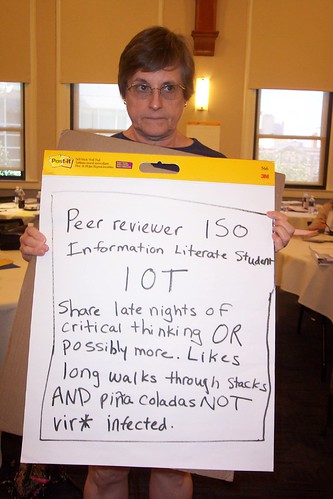
Finally, I am posting my last session summary from Immersion ’06. The remainder of time was used for working on our final products. In the program track, we developed action plans. Some example action plans from a previous Immersion are at http://informationliteracywactc.pbwiki.com/ActionPlans. At the Closing Plenary, we developed fun activities in groups. My group was Written/Student. We wrote a personal ad looking for an information literate student. Pictures from the Closing Plenary are at http://www.flickr.com/photos/amyferguson/tags/immersion06closingplenary/. I tried to get pictures of each group. I also took pictures of the Immersion Faculty performing their activity based on The Wizard of Oz musical.

July 31, 2006
Lead Faculty: Randy Hensley and Beth Woodard

In this session we got to draw with crayons and play with play dough. Randy started the session talking about authenticity and including creativity (like using crayons and play dough) as ways to improve student engagement. (I wonder if he uses crayons and play dough in IL instruction.) He suggests using Parker Palmer’s writing, national characteristics of student populations, and local data to reframe teaching in programs. One can do this by taking advantage of developmental and practice opportunities, organizational change, or leaving (as a last resort).

Beth concluded the session by encouraging us to write a personal teaching/philosophy statement. It is important that what we do aligns with what we believe about teaching. Completing a teaching perspectives inventory helps one write this statement. I found this teaching perspectives inventory with a Google Search: www.teachingperspectives.com. It is not the same one Beth provided us and I haven’t tried it, but it looks promising.