Thursday, May 31, 2007

Undergraduate Research Engine via Google Custom Search Engine

The coolest thing to come out of Google the past year is the Custom Search Engine. Libraries, organizations, and individuals can now provide their searchers customized search results, pointing them to selected sites. Google’s latest Librarian Central newsletter has a couple of good articles about the custom search engine: Editorial Value Meets Algorithmic Search and Google Custom Search Engine: A Powerful Tool for Knowledge Experts.
Inspired by ALA’s custom search engine, Librarian’s E-Library, I decided to create a custom search engine for my students called Undergraduate Research Engine. Its purpose is to help them find free authoritative sources online appropriate for college-level work. While I designed it specifically for my students, it is generic enough to be used by lower-level students (maybe even upper-level) at other colleges. In fact I have been using it for my own searches because I find the results more trust-worthy.


Sites Searched by the Undergraduate Research Engine
I set it up to search the entire Google index, but to rank listed sites higher. At this moment, it includes 44 sites. However, this number is misleading, because I told it to include all .gov and .edu sites. I realize some .gov and .edu sites aren’t as good as others, but a large number of the best sites out there fall into these 2 categories. It would be very time consuming and use up the 5000 site-limit to enter all the good .edu and .gov sites. I trust the Google algorithm (to a degree) to keep poorer sites further down the list. I did not include .org sites because there are too many non-profits with agendas. The infamous MartinLutherKing.org site is an obvious example.
This means all the good .org, as well as .com, .net, etc., sites will need to be entered individually. That is way I have opened up the engine to Volunteer Contributors. The more librarian-selected sites submitted, the better the search engine will be. To volunteer, go to the Undergraduate Research Engine and click “Volunteer to Contribute.”


Why does this engine exclude Wikipedia?
So far, I have excluded 2 sites from the search results: MartintLutherKing.org and Wikipedia. I don’t think MartinLutherKing.org needs an explanation. I excluded Wikipedia because I tell my students it is okay to get background information from Wikipedia, but it isn’t appropriate to cite it. Yet Google frequently lists it as a top site in search results. We talk about how their teachers look at their works cited list to see how well they did their research. After the submitted sites list is built up, I may remove Wikipedia from the excluded list, depending on the feedback I get. While I trust Google’s algorithm, it might be necessary to exclude other inappropriate sites that rank highly in search results.


More Custom Search Engine Features
Limits or Refinements: You can also include customized refinements to help your users limit and refine their searches. You can label submitted sites with refinement labels or allow Google to search the results for the chosen refinement. Since our students frequently have persuasive/argumentative assignments, I created 2 refinements: Ethics and Viewpoints. A student searching for “organ transplantation” will see these 2 limits at the top of their results and can select one to refine their search. I will add additional refinements as I think of them.


Add to your website: Google also provides a gadget to add a custom search engine to your own home page. You can get the code for Undergraduate Research Engine at gmodules.com/ig/creator?url=http%3A%2F%2Fwww.google.com%2Fcoop/api/018242335511370675646/cse/favv6aufpec/gadget. Go to amyferguson.net to see what this looks like.


Tips for Adding Sites
So, you have set up your own custom search engine, or maybe you volunteered to contribute to Undergraduate Research Engine, and you are ready to add sites. Google Documentation provides some guidance at www.google.com/coop/docs/cse/sites.html, but here are my 2 tips:
  • Use URL Patterns: I used the pattern *.edu/* to add all .edu and .gov sites to the list: You can also use this pattern to match sub-domains. *.bbc.co.uk/* will search www.bbc.co.uk and news.bbc.co.uk. A similar pattern www.example.com/* works to search all pages of a website.
  • Use the Google Marker: Add the Google Marker to your bookmarks or links toolbar. Then, each time you visit a site you would like to add to the search engine, you can click on the Google Marker to add it to your site. No need to enter the search engine’s control panel to add sites.
Volunteer to Contribute
If you would like to help make Undergraduate Research Engine the best engine it can be, volunteer to contribute by visiting www.google.com/coop/cse?cx=018242335511370675646%3Afavv6aufpec and clicking “Volunteer to Contribute.”

Wednesday, April 18, 2007

My Online MLA Lesson

My library has finally produced an entirely online version of one of our workshops, Research 3: The MLA Format - Avoiding Plagiarism and Documenting Sources. Students who need library credit, can complete the entire workshop, beginning at http://www.rlc.dcccd.edu/library/infolit-ol/selfenroll.htm. Since this is our first semester doing this, we are requiring students physically submit items to the library. It should be possible to submit everything electronically. Nevertheless, we want to see how well the learning activities work before we add another layer of complication.

The full workshop is only available to our students; however, the interactive lesson is available freely on the web at http://www.rlc.dcccd.edu/library/infolit-ol/mlasl/. I designed the lesson and would really appreciate some input-What works? What doesn’t?

The lesson explains different concepts of the MLA format. Each section also includes an interactive activity for students to apply the information and a self-check question to test how well they learned the concept. Students can retry the self-check until they get it right.

An instructor at any school can have their students complete the lesson. At the end of the lesson, students can print a score summary to submit to their instructor.

P.S. I designed the lesson with LessonBuilder3 by SoftChalk. My general knowledge of HTML was helpful, but not necessary, and I don’t know Flash.

Friday, March 30, 2007

PowerPoint Extreme Makeover

I recently watched an online video by Dean Shareski about making PowerPoint shows for presentations. I learned about it in a posting by Steven Bell on the ACRLog. Shareski provides a lot of good advice for those of us that use PowerPoint shows as a teaching aid. I found his advice on images the most helpful.

Use only high-quality images (photos), NOT clipart. Good teaching often brings storytelling into play. Select images that appeal to emotions. Anybody that has studied adult learning theory and student motivation knows that engaging student’s emotions can be a powerful motivator. Many of Shareski’s examples from PowerPoint makeovers illustrate this.

He supplies some places to find high-quality images, like Flickr and Google Images. But most of the images found this way would require permission to use. I need images that can be used semester after semester and posted to the web. On my del.icio.us page, I listed some sources I use to find open source images: del.icio.us/amygf/images.

Unfortunately, I am having trouble finding open source images of college students and research. I’d particularly like to find pictures of college age people working at a computer, some looking frustrated and some looking happy. At least, I want images that convey research can be very frustrating if you don’t know what you are doing, but we will learn how to make it rewarding, maybe even fun. Please post a comment if you have images that I can use or know where I can find some. Thanks!

Wednesday, February 07, 2007

Council III


Council III
Originally uploaded by AmyGF.
I am back from ALA’s 2007 Midwinter Meeting in Seattle, Washington. In addition to serving on Council, I am also on a round table executive board and on an Association committee. So, I spent a lot of time in meetings. Good thing Seattle is home to the original Starbucks and our unofficial coffee capital, because jetlag and the busy schedule made caffeine my new best friend. I did make time for some of the receptions, where there was good food (and free drinks). I only made it to one ‘informative’ session, “Digital Gaming in Library Instruction.” I will post my notes on that soon.

Here is a picture from one of my first Council sessions. "Council is the governing body of ALA." Basically, Council sets all policies for ALA. For example, we voted to make changes to the ALA Policy Manual, as recommended by the Policy Monitoring Committee. We also passed non-binding resolutions, like a Minimum Salary for Professional Librarians Resolution. A list of all actions taken by Council at Midwinter '07 should go up on this site eventually. Councilor-at-large James Casey posted his notes from Midwinter, including Council Meetings, online.

I came back a little bit more comfortable in my understanding of Council, but I still have a lot to learn.

Monday, January 08, 2007

Embedded Librarian

"The Embedded Librarian"
By Karen M. Ramsay and Jim Kinnie
Library Journal Apr. 1, 2006

In this short article, 2 librarians at the University of Rhode Island describe their attempts to reach students, particularly distant students, through technology. A few faculty have embedded librarians in their online courses, where librarians provide timely research advice and answer reference questions. In addition, they are providing IM (Instant Messaging) reference through AIM and Yahoo! Messenger, which has proved to be popular. Jim Kinnie also wrote this for the conference proceedings of the 22nd Annual Conference on Distance Teaching and Learning.

Monday, October 09, 2006

Review of r-library

A new software, called “r-library" ($14.95 US) by Riveted claims to be “Your ultimate research tool.” But it is little more than an enhanced web browser. In “r-library,” you can browse the internet, save webpages, highlight these webpages and take notes on them. But, it doesn’t appear to work with Portable Document Format (PDF) files. It provides a “citation creator,” but you still have to enter all the citation information into it. There are already free citation generators, like NoodleTools' NoodleBib that do this for free. Its primary sources are free internet sites. It completely ignores library tools in favor of Answers.com and Wikipedia. The only online database it links to is Questia, available for personal subscriptions. It does nothing to lead researchers to databases available for free from the library.

You can create a report from your saved webpages which includes the text you highlighted, source information (including the date you saved the page) and your notes. In the tutorial, the section on “Generating Reports” states, “You can now copy & paste any of the information or save it as a text file or .doc file.” Um, isn’t that plagiarism?!

Sure, if you take the time to read the “Acceptable Use Policy," you learn that Riveted “will attempt to terminate service to anyone who we become aware is repeatedly using our services in violation of copyright law.” But plagiarists have no fear! In the policy, Riveted admits that it does not police and “IT IS YOUR SOLE RESPONSIBILITY TO USE THE SERVICES IN COMPLIANCE WITH ALL APPLICABLE COPYRIGHT LAWS.” Capitalization is theirs.

Summary

Pros:
-Save, highlight, and take notes on a webpage
-Generate reports of the above which include date of access (important for citing)

Cons:
-Doesn’t work with PDFs
-Promotes poor research skills
-Encourages plagiarism

This is a commercial product with no academic value. I like the idea, but the product as it is now will only appeal to the lazy student who doesn’t know better. It could be used with the databases, but I would not recommend it to the average student. Free trail available at http://www.riveted.com/rlib_TryIt.aspx.

Friday, October 06, 2006

Presentations on Blogs and Wikis

The second session I attended at the TLA District 5 meeting was on Blogs and Wikis.
“Wikis, Briefly Considered” by Mark Gilman
“Blogs: Rethinking Library Outreach” by Davin Pate
The PowerPoints for this presentation provide some good general information on these two hot topics. They are available online at http://www.infinitevistas.org/tla/.

Thursday, October 05, 2006

Top Hits of the Reference Playlist

September 23, I attended the Texas Library Association District 5 meeting. The first session I attended was “Top Hits of the Reference Playlist” by Valli Hoski. These are the websites she recommended during the session. I have starred her favorite sites.

General Reference
*The Internet Public Library: www.ipl.org/
Internet Library for Librarians: www.itcompany.com/inforetriever/
Librarians Index to the Internet: lii.org
Onelook Dictionaries: www.onelook.com/
RefDesk: Reference, Facts, News: www.refdesk.com/
*Worldcat.org: www.worldcat.org

For Kids
FirstGov for Kids: www.kids.gov/
KidsClick!: sunsite.berkeley.edu/KidsClick!
*KidsSpace: www.ipl.org/div/kidspace/
TeenSpace: www.ipl.org/div/teen/
*Fact Monster: www.factmonster.com

Science Fair
*Cyber-Fair: www.isd77.k12.mn.us/resources/cf/welcome.html
*IPL Science Fair Project Resource Guide: http://www.ipl.org/div/projectguide/
Science Fair Central: school.discovery.com/sciencefaircentral/
Science Fairs Homepage: http://www.cdli.ca/sciencefairs/

Legal Information for Consumers
FindLaw: www.findlaw.com
NoLo Guides and Auntie NoLo: www.nolo.com
Project Avalon: Law, History, Diplomacy: www.yale.edu/lawweb/avalon/avalon.htm
CrimeLibrary: www.crimelibrary.com

Business Information for Consumers
Business.com: www.business.com
Hoovers: www.hoovers.com
MarketWatch: www.marketwatch.com
BigCharts: bigcharts.marketwatch.com/
BankRate.com: www.bankrate.com

Friday, September 01, 2006

Improving Teaching in Your Program


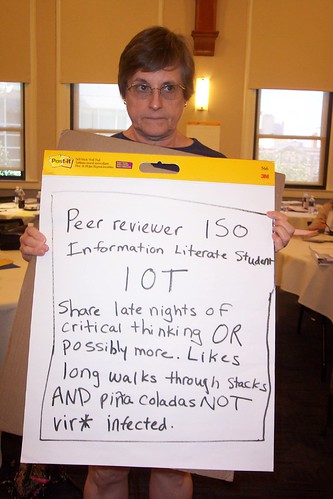
Finally, I am posting my last session summary from Immersion ’06. The remainder of time was used for working on our final products. In the program track, we developed action plans. Some example action plans from a previous Immersion are at http://informationliteracywactc.pbwiki.com/ActionPlans. At the Closing Plenary, we developed fun activities in groups. My group was Written/Student. We wrote a personal ad looking for an information literate student. Pictures from the Closing Plenary are at http://www.flickr.com/photos/amyferguson/tags/immersion06closingplenary/. I tried to get pictures of each group. I also took pictures of the Immersion Faculty performing their activity based on The Wizard of Oz musical.

July 31, 2006
Lead Faculty: Randy Hensley and Beth Woodard

In this session we got to draw with crayons and play with play dough. Randy started the session talking about authenticity and including creativity (like using crayons and play dough) as ways to improve student engagement. (I wonder if he uses crayons and play dough in IL instruction.) He suggests using Parker Palmer’s writing, national characteristics of student populations, and local data to reframe teaching in programs. One can do this by taking advantage of developmental and practice opportunities, organizational change, or leaving (as a last resort).

Beth concluded the session by encouraging us to write a personal teaching/philosophy statement. It is important that what we do aligns with what we believe about teaching. Completing a teaching perspectives inventory helps one write this statement. I found this teaching perspectives inventory with a Google Search: www.teachingperspectives.com. It is not the same one Beth provided us and I haven’t tried it, but it looks promising.

Wednesday, August 30, 2006

Assessment of Information Literacy Programs

From Immersion '06, July 31, 2006

Faculty Lead: Debra Gilchrist

For assessing a program, as opposed to student learning, Deb reframed the 5 questions from her “Assessment-as-Learning” sessions.

  1. “What do you want the instruction program to be able to do? What does it do when it meets student needs and/or supports student learning?” (Outcome)
  2. “What factors does the program demonstrate or exhibit if they are meeting the outcomes? What will be happening?" (Indicators)
  3. “How will you gather your data or evidence?” (Assessment)
  4. “How will you determine if you have achieved your outcomes?” (Criteria)
  5. “How will the discussion or evaluation of the data occur? Who will be involved?” (Change)

It is important that the assessment leads into a cycle of continual improvement. Deb’s cycle of Outcomes/Indicators/Assessment/Criteria/Change reminded me of the Plan/Do/Check/Act cycle used in my organization. Deb recommends using ACRL’s “Characteristics of Programs of Information Literacy that Illustrate Best Practices” when establishing program outcomes.

Monday, August 28, 2006

Campus Cultures

From Immersion '06, July 30, 2006

Faculty Lead: Craig Gibson

A culture includes a combination of explicit knowledge (factual and recorded) and tacit knowledge (attitudes and beliefs). The “five core academic values of faculty” are 1) collegiality, 2) autonomy, 3) academic freedom, 4) specialized expertise, and 5) reason/scientific method.* They see librarians as “process, procedure oriented; rule-bound; service role rather than educational one; not seen as equals;” and “not aware of instruction that librarians already do.”

The campus culture also consists of a student culture, a library culture, and an administrative culture. In order to integrate information literacy into the curriculum, we need to “tap into all the cultures” and “bring them together.” Gibson quoted the “core changes strategies within the academy” from an article in The Journal of Higher Education (July/Aug. 2002) by Kezar and Eckel: “senior administrative support,” “collaborative leadership,” “robust design” (a collaborative and evolving blueprint of the future), “staff development,” and “visible actions” (actions that “show the culture is changing”). He emphasized robust design and visible actions.

* Barbara Walvoord. Academic Departments: How They Work, How They Change. ASHE-ERIC Higher Education Report, v. 27, no. 8. San Francisco: Josey Bass, 2000, pp.15-17.

Friday, August 25, 2006

So Whatsa Program?

At Immersion, July 30, 2006

Faculty Lead: Craig Gibson

Program Structure: From the Systems view, “structures consist of interrelated parts.” “Structures make sense, are visible to all the parties involved.” An IL Program structure is not linear, but a “spiral curriculum” (“Structures develop a progression of knowledge.”) An IL program structure consists of a horizontal scope (how many) and vertical scope (how long) that promotes the “Diffusion of Innovation.” Traditional Bibliographic Instruction helps the student finish the assignment but does not connect with the course. In an Information Literacy program, learning opportunities are embedded in the course. To get to an IL program, we can begin by leveraging the one-shot session. (See Clueless in Academe)

Wednesday, August 23, 2006

Leadership Orientations

At Immersion, July 30, 2006
Faculty Lead: Karen Williams


We began with a Leadership Orientations questionarre. Most in the room scored either as a Structural or Human Resources leader. According to Karen, these are the two most common frames in librarianship. A few scored as Symbolic, but only 2 scored as Political leaders. These four leadership frames: Structural, Human Resources, Symbolic, and Political come from Bolman and Deal's book that is used in the ACRL/Harvard Leadership Institute. Reframing is important because it broadens our perspective, helps manage complexity, and “provides a basis for effective and informed action.”


**It is crucial to create an Information Literacy Vision.**


There was then a discussion of what a leader is with views from several authors. Karen’s view of leaders:
  1. Storytellers (Boyett & Boyett 1999)
  2. “design learning processes” (Senge 1990)
  3. “work with all in a community of leaders” (Barth 1992)
  4. “take risks and are open to change” (Bennis 1997)
  5. view mistakes and failure as learning opportunities (Bennis 1997).

Karen suggested we create leadership growth plans. She recommends Peter Senge’s The Fifth Discipline Fieldbook.


Our activity was an Opportunity Assessment: “Know your audience, focus on the change makers, and know their turf, use their issues.” It was also suggested that we draft short “sound bites” and a back-up plan.


Leadership Tools

From Senge’s Fifth Discipline Fieldbook (1994), the needed tools are: “personal mastery and self awareness, systems thinking, shared vision, mental models and team learning.”

There was a short discussion on change, including John Kotter’s (1996) process of creating change and human reaction to change. The session ended with a very brief overview of Force Field Analysis and the Ease/Impact Model.

Thursday, August 17, 2006

Changing Paradigms

An Immersion event, July 29, 2006

Faculty Lead: Karen Williams

Bibliographic Instruction and Information Literacy are actually two different things, and most of what we do is still bibliographic instruction. According to Karen, the goal of bibliographic instruction is “to teach how to find information in the library” and the goal if information literacy is “to be an effective user of information in any format and place.” In an information literacy program model, information literacy is integrated into the curriculum. A librarian does not have to be present for information literacy instruction to take place. Changing from an “instruction paradigm” to a “learning paradigm,” as described by Robert B. Barr and John Tagg will allow information literacy instruction to be scaleable.

Tuesday, August 15, 2006

Assessment-as-Learning

During Immersion, Debra Gilchrist presented 3 workshops on assessment, 2 general sessions on assessment-as-learning and 1 on program assessment. My notes from the first 2 sessions are below. I will post my notes from the session on program assessment later.

Assessment as Learning Pt. 1 July 29, 2006
Faculty Lead: Debra Gilchrist
Deb’s 2 rules for assessment: 1) Work backwards from what you students to be able to do and 2) Assessment is about student learning.
Deb’s “5 questions for assessment design:
  1. “What do you want students to be able to do?” (Outcome)
  2. “What does the student need to know in order to do this well?” (Curriculum)
  3. “What activity will facilitate learning?” (Pedagogy)
  4. “How will the student demonstrate the learning?” (Assessment)
  5. “How will I know the student has done this well?” (Criteria)
Deb’s outcome writing formula: Verb phrase + “in order to” + impact phrase
An example from Deb: "Develop topic relevant vocabulary in order to search databases with maximum flexibility and effectiveness."

Bloom’s Taxonomy is helpful in writing the verb phrase that describes what you want the student to be able to do. The impact phrase explains why you want the student to be able to do it.

Assessment-as-Learning Pt. 2 July 30, 2006
Faculty Lead: Debra Gilchrist
This session began with a brief review of the outcome formula. In the formula, the verb phrase is the skill and the “in order to” statement is the application or impact. Deb believes outcomes are fully measurable. Recall from the “good learning outcomes” slide that they are measurable/“judgeable.” Measurable outcomes are quantitative and judgment outcomes are qualitative. A judgeable outcome is where the instructor can see that the student has improved (I am thinking this means behavior wise). Assessment test like SAILS and ETS can provide a benchmark. The best assessments include a critical thinking element. Debra than shared some documents demonstrating IL assignments and outcomes that librarians have helped faculty develop and self-assessment students utilize in library workshops.

At Pierce College, the library provided a faculty workshop where they analyzed assignments with faculty. The faculty submitted assignments in advance and the librarians identified what IL concepts students needed to know in order to complete the assignment. They then worked with faculty to revise outcomes.

At Pierce College they assess only one out of five outcomes each year so that each out come will be assessed at least once over an eight year period. More important outcomes may be assessed more often than less important ones. At first they only assessed 1 in 10 sessions (10%), now they assess 1 in 4 (25%).

PS. Be sure to check out Pierce College's Library Instruction Program. Notice that Information Competency is on of the college's 5 core abilities. Pretty cool, huh?

Thursday, August 10, 2006

Immersion Opening Plenary

Following is a summary of the first session at Immersion '06. My notes from other Immersion events will be following soon.

Opening Plenary June 29, 2006

Faculty Lead: Craig Gibson
After all the faculty introduced themselves, the program begin with discussion on the definition of information literacy that included the “7 Ages of Instruction,” a jig-saw reading activity on 5 articles that defined information literacy and Christine Bruce’s “Seven Faces of Information Literacy in Higher Education.”
For the next part of this session, we watched “The Deep Dive,” a fun Nightline clip about an innovative design company called IDEO. IDEO immerses itself into a design problem and uses play to foster innovation. Their five brainstorming rules are:

  • “Defer judgment”
  • “Encourage wild ideas”
  • “Build on the ideas of others”
  • “Stay focused on topic”
  • “One conversation at a time”
  • “Be visual”
  • “Go for quantity”

Sunday, August 06, 2006

Immersion '06


Simmons Conference Center
Originally uploaded by AmyGF.
Well, I got home from ACRL’s Institute for Information Literacy Immersion ‘06 in Boston a few days ago and I am dripping wet after being thoroughly immersed in Information Literacy for nearly a full week. It was an intense, but great experience. Not only did I learn a lot, but my perception of Information Literacy has changed and I’ve gotten so many ideas I want to try out.

I participated in the Program Track and our final product was an Action Plan to bring home. While my Action Plan still needs some work, it lays out some goals that I believe we can achieve within the next year.

Some pics from Immersion are available at www.flickr.com/groups/acrlimmersion2006/. Most of these pics are from the Teacher Track, but it still gives you good idea of what the whole program is like.

I’m still working on my summaries of events, but those will likely appear shortly.

Friday, July 21, 2006

ALA Annual 2006

I attended the following events at ALA this year:

Serving the Underserved - Distance Education & the LIS Degree
Speaker 1 discussed how the profession views distance education. Many look down on distance education programs, but most graduates of distance programs are satisfied with their education and employers are happy with distance LIS graduates. Speaker 2 explained how distant students can receive the same level of education as traditional students by researching LIS programs, using internet communication tools, participating in library associations, and work experience. Speaker 3 listed the pros and cons of distance education. Speaker 4 discussed distance education from an instructor’s perspective.

Ethical and Legal Issues in Reference Discussion Group
In this informal discussion, librarians chatted about the role of libraries and librarians in detecting/preventing plagiarism. We also pondered how to handle purchased items that turn out to be plagiarized or fabricated (as in Frey’s A Million Little Pieces). Although it was an interesting conversation, there were no grand revelations.

Making Assessment Work for You: How Information Literacy Tests Can Help Support Library Programs
Speakers discussed the development and use of 2 assessment tools: Project SAILS and the ICT Literacy Assessment. I was late and missed Carolyn Radcliff and Joe Salem discussing the development of Project SAILS. Much of Wendy Holliday’s presentation on Utah State University’s experience with SAILS and assessment of information literacy is in the document at library.usu.edu/instruct/english-assess-infolitreport.pdf. I thought it was interesting that SAILS scores showed no significant differences in freshman and sophomores, but the few seniors who participated did do better than underclassmen. Their citation analysis was also interesting. Of the few students who did provide citations, they were mostly websites and 16 websites accounted for 49% of the citations.
I cannot recall anything about Teresa Egan’s presentation on the development of ETS’ ICT Literacy Assessment, however, there is a lot of info about this test at www.ets.org/itcliteracy. Lesley Farmer discussed her experience with the ICT assessment. From her experience, the test focused too much on technology and not enough print IL, it was time consuming, and not aligned with the curriculum. They also experienced technical difficulties while administering the test and had to have the campus’ firewall turned off.

The Long Tail: The Internet, Culture and the Mega-Store
This was the most interesting session I attended at ALA 2006. Chris Anderson, author of the recently published The Long Tail: Why the Future of Business is Selling Less of More, discussed the “long tail” and how libraries contribute. Anderson’s “long tail” describes the shift in consumer purchases away from a heavy focus on popular products to a focus on niche products with less mass appeal. For example, when I was a teenager, I bought most of my music CDs at Wal-Mart. My purchases were limited to products available in Wal-Mart, mass produced and mass distributed. But thanks to online stores, like Amazon, I can easily find and purchase less popular works, such as music by Sherie Rene Scott or O’2L.

If you graph product purchase versus popularity, a tall spike (of popular products) occurs with a long tail of niche products following. While no one niche product sells more than any of the popular products, all together, the niche products sell more than the popular products all together. The long tail affects entertainment, publishing, advertising (think AdWords), credit cards and even “libations” like beer. You can read a little more about “long tail” at www.longtail.com/about.html and in Anderson’s original article on the subject at www.wired.com/wired/archive/12.10/tail.html.

The “long tail” can be seen in libraries through interlibrary loan, online databases, and Google Book Search. Interlibrary loan and online databases provide users access to a much broader access to materials than what they have at home or even in their libraries. Google’s Book Search helps users become aware of books that they might not have been aware of. Select slides of Anderson’s PowerPoint from this talk are available on his blog at www.longtail.com/the_long_tail/2006/06/t_minus_15_and_.html.

Events I Did Not Attend
I did not attend the following events, but resources related to these events and other blog summaries are available online.

ACRL President’s Program: The Emperor Has No Clothes: Be It Resolved That Information Literacy is a Fad and Waste of Librarians’ Time and Talent: acrlblog.org/2006/07/04/the-great-debate-is-information-literacy-a-fad-and-a-waste-of-time/

Drug Foods, Fast Foods, and Feasts: A Social Science of Eating: acrlblog.org/2006/06/30/anss-program-at-ala-is-food-for-thought/

Go Where They Are (And Go Now!): acrlblog.org/2006/06/29/go-where-they-are-and-go-now/

I'm Dancing As Fast As I Can: Building a Career When Personal Responsibilities Demand More of You: www.geocities.com/ccnmrt/2006annual/

The Power of Personal Persuasion: bryanloar.blogspot.com/2006/06/power-of-personal-persuasion_24.html

Publish, Don’t Perish: Helpful Hints for Authors: acrlblog.org/2006/06/26/help-with-publishing-can-keep-you-from-perishing/

LITA Events: litablog.org/category/ala-2006/


If you have a link to resources or summaries of events from ALA 2006, please share!

Friday, June 30, 2006

N'Awlinz

I returned from ALA Annual a few days ago. Everybody in New Orleans was very welcoming. I don’t think we have ever received such a warm reception. The French Quarter didn’t receive much damage from Katrina and was just like I remembered it. But librarians who made it out to the ninth ward and other damaged areas said it was worse than they had imagined. Refer to the following articles for more about the current state of New Orleans and ALA in New Orleans.

“Ten Months After Katrina: Gutting New Orleans:” www.justiceforneworleans.org

June 27 Times-Picayune article: www.nola.com/entertainment/t-p/index.ssf?/base/living-6/115138795910710.xml

CNN Video: www.cnn.com/video/partners/clickability/index.html?url=/video/us/2006/06/26/callebs.nola.convention.affl


I attended the following events and plan to post summaries soon. Event descriptions are from the conference program. There were also a lot of great looking events that I didn’t get to attend and I will be looking for summaries of those events too.

Serving the Underserved - Distance Education & the LIS Degree
Date: 6/24/2006 10:30 AM -- 12:00 PM
Location:Morial Convention Center room: Rm. 342
Meeting Type: Open
Description: Social and technological changes in recent years have created a virtual revolution in the field of LIS education. Currently there 12 institutions that offer ALA accredited degrees that can be completed entirely on-line. Many others have extensive distance education components. Four Spectrum Scholars and an LIS professor will discuss the advantages, challenges, and unique “classroom” dynamics that this phenomenon creates, particularly for students from underrepresented groups. Moderated by Mark Puente, 2003 Spectrum Scholar.

Ethical and Legal Issues in Reference Discussion Group
Date: 6/24/2006 1:30 PM -- 3:30 PM
Location:Hotel Intercontinental room: Poydras
Meeting Type: Open
Description:
Amy’s note: Topic was Plagiarism

Making Assessment Work for You: How Information Literacy Tests Can Help Support Library Programs
Date: 6/25/2006 8:00 AM -- 10:00 AM
Location:Morial Convention Center room: Rm. 286-87
Meeting Type: Open
Description: Standardized tests are being used to measure the information literacy competencies of K-16 students. Results from these tests can have a profound effect on how administrators look at information literacy. What are these tests assessing and how can we use these tests to our advantage? This program will present a panel of testing experts and practitioners who will discuss how these tests work and how test scores can be used by librarians as data to support library programming.

The Long Tail: The Internet, Culture and the Mega-Store
Date: 6/26/2006 10:30 AM -- 12:00 PM
Location:Morial Convention Center room: Rm. 298-99
Meeting Type: Open
Description: Speakers will discuss information commons and new strategies for libraries.

Monday, June 05, 2006

Information Literacy for the 21st Century Learner

I recently viewed the teleconference, “Information Literacy for the 21st Century Learner: Reaching At-Risk High School and Community College Students,” provided by the College of DuPage’s Library Learning Network. The program focused on a project with the same name by the Network of Illinois Learning Resources in Community Colleges (NILRC). A major component of this project is the Needs Assessment Instrument, which is available for others to use free of charge.

Other Things I Learned About

Standards: In developing this project, NILRC not only referred to information literacy standards, such as those by ACRL and AASL, but also considered general education standards: the Secretary's Commission on Achieving Necessary Skills (SCANS) and the Center for Educational Policy Research’s Standards for Success. SCANS considers the skills required to succeed in the modern work world. The report lists 6 “Functional Skills Needed for Effective Work Performance,” including “Information Management: Acquires and uses necessary information.” The purpose of the Standards for Success project was to define the skills students needed to successfully complete entry-level university courses. Several of the standards, provided in Understanding University Success, focus on the ability to locate and use information.

Instruction Design: Lisa Janicke Hinchliffe discussed the Kolb Cycle of Experiential Learning, Gagne’s Nine Events of Instruction, and ARCS Motivation Theory.